Automation#Social media automation
Easel: open-source social media agent, from trend watch to publishing
Easel is an open-source social media agent from ZJU and PKU: it finds trends, drafts content, publishes to 7 platforms, and learns what works.
Project facts
GitHub Ecosystem- License
- Apache-2.0
- Language
- Python
- Stars
- 2,579
- Data checked
- 2026-09-30
Snapshot figures reflect the check date and may change over time.
Running a social account usually means juggling five tabs: chasing trends on one platform, drafting on another, then logging into Xiaohongshu, Douyin or Zhihu to format and upload by hand, with nothing feeding performance data back into what you make next. Easel (ZJU-REAL/Easel), the open-source project the WeChat Channels account 广叔AI recommended on September 30, wants to close that loop. Built by Zhejiang University’s REAL lab with Peking University (Python, Apache-2.0, about 2.6k stars as of 2026-09-30), it wires an OpenClaw agent, account profiles, content skills and real media tools into one workflow — discover, plan, create, publish, attribute. The mechanism worth watching is the account profile: each account keeps its own positioning, style, audience and long-term memory, and post performance flows back into it for the next round.
Core features
Easel organizes everything around a five-stage workflow.
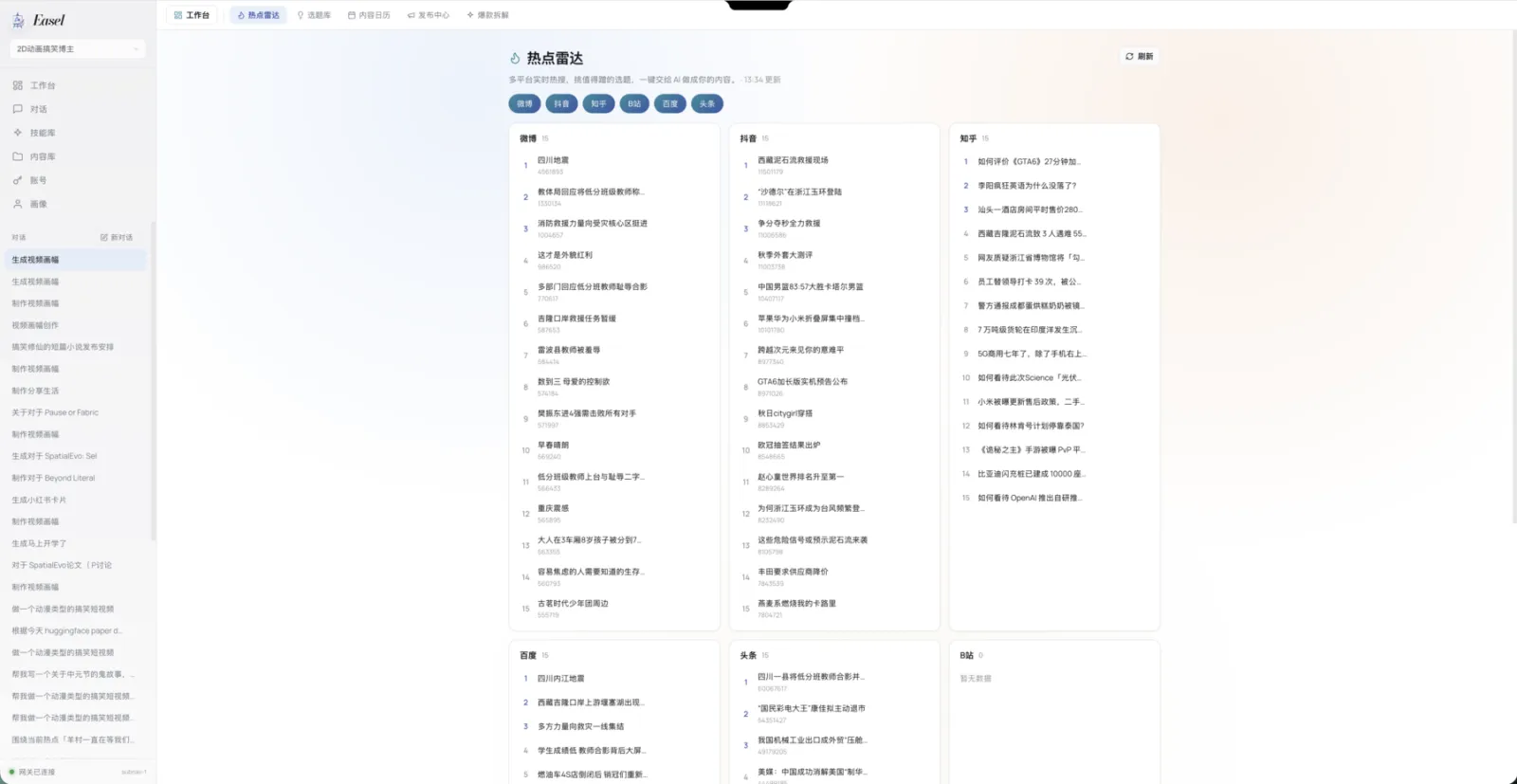
- Discovery and planning: a hot-topic radar aggregates trending lists from Weibo, Douyin, Zhihu, Bilibili, Baidu and Toutiao; the agent filters what fits the current account, then turns opportunities into topic matrices, title hooks and a content calendar.
- Creation that executes: all 113 skills ship runnable scripts — copywriting, Xiaohongshu knowledge cards, posters, voiceover, subtitles, video editing, AI mini-dramas — and finished assets land in
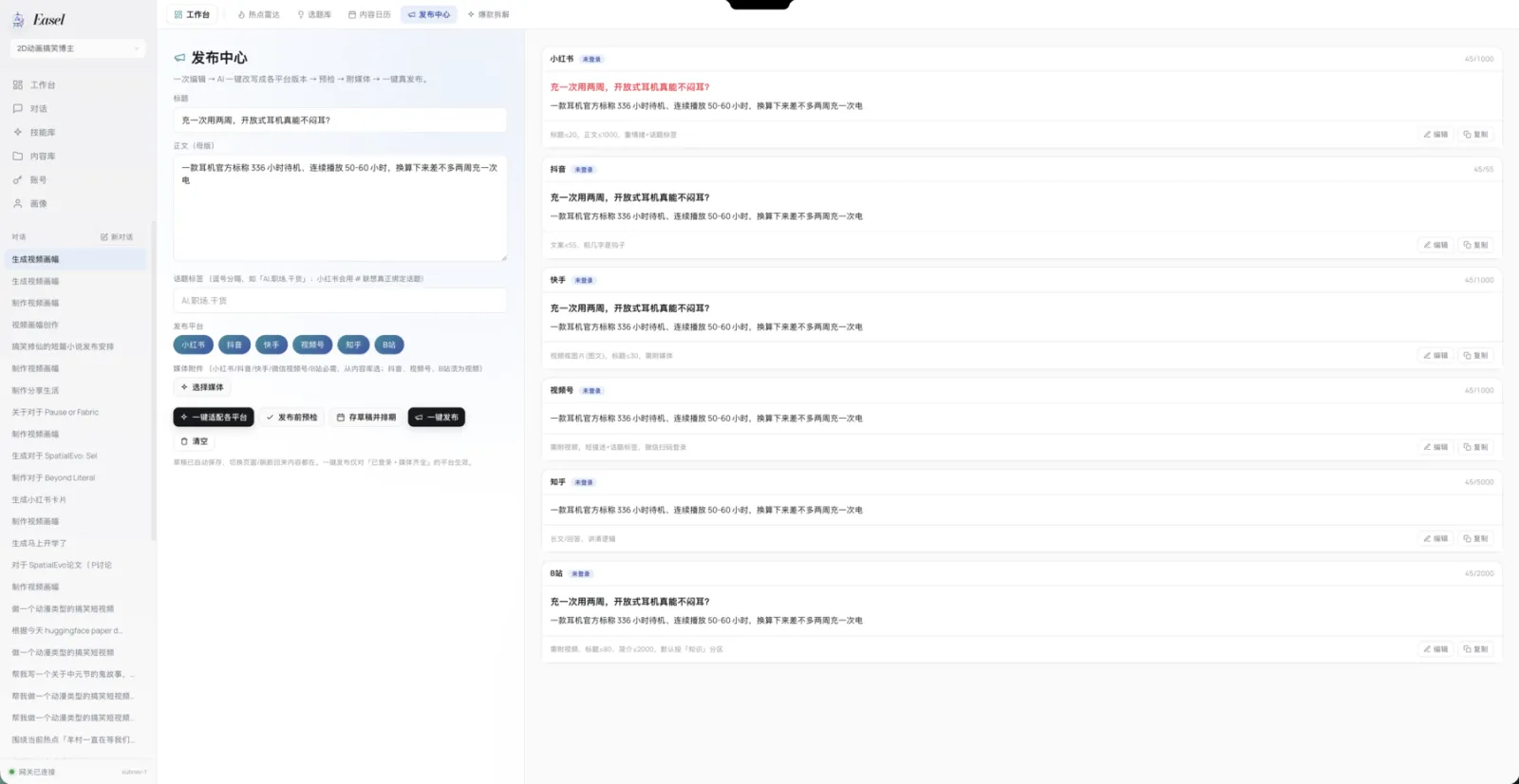
outputs/instead of chat history. - One draft, many formats: the publish center rewrites one topic into per-platform versions, aligning title and body limits (in the screenshot, Xiaohongshu titles cap at 20 characters, Bilibili descriptions at 2,000), aspect ratios and media requirements, leaving the final tweaks to you.
- Publishing to seven platforms: Xiaohongshu, Douyin, Kuaishou, Zhihu, Bilibili, WeChat Channels and WeChat Official Accounts support login, adaptation and publishing, with a quality gate plus sensitivity and copyright checks before anything goes out; account data can be pulled back for review.
- Profiles that improve with use: each profile is a
profiles/<name>/directory with six dimensions — positioning, style, audience, platforms, preferences and red lines, long-term memory. One profile can serve several logged-in platforms.
Typical use cases
Easel fits creators who want an agent to carry the daily run of an account.
- Solo creators: set up one profile for your Xiaohongshu or Douyin account, pick a topic from the radar each day, let the agent draft the card post or video script, review it, then publish from the center.
- Science and explainer teams: the README’s showcase is full of paper-explainer cards and videos — feed it a paper link and get graphics, quote cards and a voiceover script, handy for university labs and tech media.
- Multi-platform matrices: reuse one profile across logged-in platforms and let one master draft become a Xiaohongshu card, a Zhihu long-form post and a video script, all scheduled on one calendar.
Quick start
Easel installs through a guided setup.sh, which checks Python 3.10+, Node.js 22.19+ and FFmpeg, then installs OpenClaw and Playwright Chromium:
git clone https://github.com/ZJU-REAL/Easel.git
cd Easel
bash setup.sh
The easel command lives in the project’s .venv, so activate it first — every new terminal needs it:
source .venv/bin/activate    # easel is installed in .venv; activate it first (Windows: .venv\Scripts\activate)
easel doctor                 # check the environment
easel ping                   # test gateway and Agent connectivity
easel web                    # start the Web workspace
# or: easel chat             # chat in the terminal
easel web serves the workspace at http://localhost:7860. The minimum config is one LLM key in the project-root .env (Anthropic or an OpenAI-compatible service); AI video, music and cloud voiceover are optional skills you configure only if you use them.
Summary
Easel suits solo creators and small teams ready to hand the whole topic-to-review chain to an agent; if you only need to distribute finished videos, AiToEarn (a distribution agent covering 14 platforms) or the lighter social-auto-upload (Python scripts for the upload step) do less but simpler. It’s Python under Apache-2.0, created 2026-08-28 with the last push on 2026-09-30, at 2,579 stars as of 2026-09-30 — a young project.
Four things to know up front: be careful with Xiaohongshu — the README explicitly warns the platform may detect automation, risking verification, throttling or account restrictions, and suggests previewing, running the pre-publish checks and posting manually after your confirmation, while other platforms are fine; Easel runs on an OpenClaw base (the installer creates an isolated easel profile without touching your existing setup) and you bring your own model key; platform accounts must be logged in on your machine through the Web workspace, with credentials and cookies staying local — the README tells you never to commit .env or login state; and Windows adaptation still tops the roadmap, so treat native installs as early.